












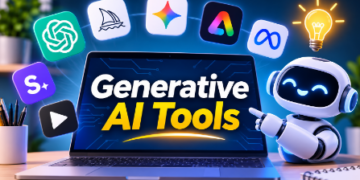
























From being a curiosity to widely used every day, generative AI has come a long way. With just a few minutes and a mere lack of technical expertise, you can now write a report or create a small logo, make a simple app or copy a voice for a podcast. When it comes to the problem, it’s choice. Tools are added on a weekly basis and a lot of them guarantee the exact same thing.
This guide boils it down to 20 tools that you should know in 2026, organized by the tools that they do best. Many are free or have a free trial period so you can try before you buy. All the features, models and prices vary rapidly in this area, so before you put your money in, ensure that you have the latest information on each individual tool from their official websites.
What Are Generative AI Tools?
Generative AI tools are a form of artificial intelligence. They are trained on vast amounts of data such as text, code, images and audio to produce an output. The generative AI tools will essentially understand how different data types relate to each other for almost anything you can think of and then create something new. These tools are being used to transform many industries by automating processes, increasing efficiency and analysing and visualising data.
Use Text and Reasoning Tools to refine and enhance your writing.
Your swiss army knife! Writes, summarises, explains, outlines, brainstorms and most have images, files & voices.
1. ChatGPT
Ideal for: General writing, brainstorming and common questions
OS: Linux, macOS, Windows & BSD. Languages: JAVA, Python,PHP,.NET, JavaScript & more.
ChatGPT is still one of the most popular Generative AI Apps. It allows you to draft, edit, plan, get coding direction, have voice conversations and create images in one location. It’s a good starter tool for beginners since it is capable of doing a lot of things.
2. Claude
Use case: Ideal for longer pieces of text, careful writing, analysing and coding assistance.
Free tier, extra functionality and usage can be purchased.
Popularly used for longer pieces of text such as summarising a lengthy report, rewriting a draft or rationalising through complex problems. It is highly popular amongst developers for coding assistance. It is best to try out a couple to find what works best for you on your projects.
3. Google Gemini
Overall best for: Google users.
Price: Free versions available. Google AI plans can be bought.
Gemini is used within Google products such as Gmail, Google Docs, Google Drive and Android. Supports text, images and more. Could save time switching between apps if most of your work is done in Google Apps.
4. Microsoft Copilot
Best for: Word, Excel, PowerPoint & Outlook. Windows Users.
Price: Free version. Extra functionality with Microsoft 365 plans.
Its game is being part of the Microsoft suite that many offices will have. Can summarise documents, write emails, understand information in spreadsheets and help create presentations.
5. Perplexity
Notes – Great for fast research and linking sources.
Free with Pro option.
An easy way to search as it will give you direct answers, plus tell you where it got it from. Good as a quick reference tool, however is always better to follow the links.
Image Generation Tools
One tool will turn text into images,
6. Midjourney
Best for – Creative, stylised and high quality images.
Paid options
It is well known for creating visually stunning images with a unique style. While you can learn what makes a good prompt with practice, designers, illustrators and hobbyists will create concept art, mood boards and creative experimentation.
7. ChatGPT’s Image Generation
Easy to generate and manipulate images within chat. Best for – easy to generate and manipulate within chat.
Available on ChatGPT plans with some limitations.
The image tools from OpenAI have been added to ChatGPT. Simply describe the image you want and build upon it in your chat. This is a more easily accessible option rather than learning a whole new app.
8. Adobe Firefly
Why you’ll love it – Business related tasks
This was created for the business and will demonstrate Adobe’s effort into licensing training resources. It has links to Photoshop and Illustrator so can very helpful if you use Adobe packages.
9. Canva Magic Studio
Best for – Graphic design for social media, presentations, quick designs.
Not free – Pro tier.
Canva now offer AI tools to use within their easy to use design tool. This includes removing backgrounds, resizing, generating images and text! The tool will help marketers, business owners and students alike.
Video Generation Tools
AI videos are moving pretty quickly and there are tools on offer. From short video clips to talking heads.
10. Runway
Camera ideal for creative filming that will give very detailed controls.
Limited free credit – Paid versions.
One of the preferred choices for those wanting to get hands on with how they want the clip to look. With editing tools and generation, this provides a great way to test different ideas for short sequences.
11. Google Veo
There are options for medium and high difficulties. These create realistic videos based on text and/or imagery prompts The cost will vary depending on what google offer in their plans/products.
It offers realistic animations and visuals. Veo is Google’s video model. It has been implemented in many Google products. Different options are available to use across various areas, with subscriptions.
12. Kling
Good for: Stylish storytelling, Imagery to video clips.
Lifetime: Free, Paid;
Kling is known for creating stylish and expressive imagery. They can bring your static images to life. Great to try if you need short videos for social media or just fun short videos.
13. Synthesia
Ideal for: AI Presentations in business videos
Countries: Global
Synthesia is an AI video creation programme that creates videos with avatars that can talk through your content in many different languages. It can help with training and onboarding as well as product explainers due to it being too expensive to film a real person presenting. It is important to note that if your audience may believe they are interacting with a real person, to make clear this is an AI avatar.
Audio and Voice tools
14. ElevenLabs
Ideal for: Realistic speech and voiceovers
Payment: Free Plan; paid Plans
ElevenLabs is a studio that creates realistic voices for narration, audiobook recordings, videos and accessibility. Use only voices which are allowed to be used, and do not imitate a real person without their permission.
15. Suno
Good for: Generating songs based on prompts provided in text form
Free version. Other versions available.
With Suno, it is possible to make a full song with vocals and instrumentals from just a brief description. Great for hobbyists and content creators, but make sure to check out the license information before using any song commercially.
Coding Assistants
Some tools can help with coding. They can tell you what the code means, suggest changes, create boilerplate and even whole features. Just ensure you test the code written by the AI.
16. GitHub Copilot
Good for: Suggesting code in popular code editors
Free version for some people. Other versions available.
GitHub Copilot is probably the most famous coding assistant out there. Not only does it make suggestions line-by-line and function-by-function, but it also includes a chat feature to ask questions about the code.
17. Cursor
Best Suited For: AI first code editor – write code for your project with the full extent
This has been designed with the capabilities of artificial intelligent in mind. It understands your project, explains your code and also makes code changes across multiple files. As such Cursor has become very popular for both amateurs and experts.
18. Lovable
Best Suited For: Creating simple web apps from plain language descriptions.
Lovable is a great tool for even the most basic of coders. This allows the writer to describe their app and watch a prototype appear on their screen. While this does work well for trying out some ideas, this is not suitable for more complex projects.
Productivity & Presentations Tools
19. NotebookLM
Good for: Researching using your own documents
This allows you to upload Pdfs, notes and articles and then ask questions. Great for studying, research and anyone that needs to get their head around lots of reading material.
20. Gamma
Great for: Creating documents and presentaitons quickly
Free, with paid option.




Gamma will generate a stunning slide deck in minutes. Whilst it won’t be a replacement for a designer when pitching for something, it will do a perfect job.
Quick Comparison
| Category | Tools |
| Text and reasoning | ChatGPT, Claude, Gemini, Microsoft Copilot, Perplexity |
| Images | Midjourney, ChatGPT images, Adobe Firefly, Canva Magic Studio |
| Video | Runway, Google Veo, Kling, Synthesia |
| Audio and voice | ElevenLabs, Suno |
| Coding | GitHub Copilot, Cursor, Lovable |
| Productivity | NotebookLM, Gamma |
How to Choose the Right Tools
- Work out what you want to create.
- Most have a free option to try before you pay.
- Read the licensing options – if you are planning to use them for commercial purposes.
- Avoid sharing any private or sensitive information.
- Most of the time you will use tools that integrate with apps you already use.
- Don’t over commit. Choose a core assistant and only add niche tools as needed.
Using Generative AI Responsibly
Whilst Generative Al can be very powerful, there are some limitations and risks.
- Fact check. As Generative AI can often be very confident about incorrect information, especially when it comes to numbers, quotes and references.
- Respect copyright and consent. Don’t copy the style of living artists for commercial gain. Or clone voices and faces without consent.
- Be honest. If your audience may be confused by the fact that something has been created using AI, be open about it.
- Carefully review your code. Make sure anything you deploy has been tested and secured.
- Don’t forget to use humans. Use AI to help speed up your work but do not forget to use your own judgement.
Benefits of Using AI Tools
There are many advantages of using generative AI tools. These include:
– Increased Efficiency: These tools help automate repetitive tasks, giving you more time to focus on strategic and creative tasks.
– Increased Creativity: These tools can provide new ideas for different use cases. This helps you overcome creative blocks and explore new possibilities.
– Improved Decision Making: Using generative AI can help provide insights into data, allowing you to make more informed decisions.
– Personalization: These tools allow you to personalize your content, products, and services to match user preferences and increase customer satisfaction.
– Cost Savings: These tools help improve processes, automate tasks, and reduce errors, ultimately saving you money.
Final Thoughts
There isn’t really a ‘best’ Generative AI tool, but rather the best tool for the task. Depending on what you’re trying to achieve, you may need to use a combination of tools. For example, a writer may need to use an assistant and research tool, whereas a marketer may need to use an image generator and video platform. A developer may use a coding editor. To find the Right Tool
Start by looking at which category you need. Try out any free options and only keep the tools that are saving you time. Whilst this space will always evolve, having a mindset of trying things out, fact checking and keeping control will help you no matter which tool is the ‘best’ next year.